You’ve heard the term. Maybe at a CLE, maybe in a podcast ad, maybe from the vendor who emailed you three times last month. Agentic AI. It sounds technical. It probably made you think of robots or science fiction. And you probably filed it in the same mental drawer as “blockchain” and “the metaverse” and moved on.
That was the right call for most AI buzzwords. It’s the wrong call for this one.
Agentic AI for lawyers isn’t a tech trend. It’s a structural change in what a one-person or two-person law firm can actually do. This guide explains exactly what it is, how it works inside a real practice, what the ABA says you need to know before you deploy it, and how to tell the real thing from the hype.
No jargon. No sales pitch. Just what’s true.
Table of Contents
- The One-Sentence Definition (And Why It Changes Everything)
- Agentic AI vs. ChatGPT vs. Legal Software: An Honest Comparison
- How Agentic AI Actually Works: The Four Components
- What Agentic AI Looks Like Inside a Real Law Firm
- What Most Articles Get Wrong About Agentic AI for Lawyers
- The ABA Ethics Rules That Apply: Read This Before You Deploy
- 7 Questions to Ask Any Agentic AI Vendor
- What Agentic AI Costs in 2026: Real Numbers
- Frequently Asked Questions
The One-Sentence Definition (And Why It Changes Everything)
Agentic AI is an AI system that takes action on your behalf, without you clicking anything, across multiple software tools, to complete a task from start to finish.
That’s it. That’s the whole definition. But unpacking what “takes action without you clicking anything” actually means is where this gets interesting.
Every other AI tool you’ve used requires you to do something. You open ChatGPT. You type a prompt. You read the response. You copy it somewhere. You decide what to do next. The AI helped you, but you were still the one driving. You had to be present, paying attention, making the next move.
An agentic AI system doesn’t wait for you. It watches for things to happen, decides what to do when they do, executes across your actual software systems, and completes the task. You’re not in the loop until it needs a decision only you can make.
For a solo lawyer who’s already doing the work of three people, the gap between “AI helps me work faster” and “AI handles entire workflows while I’m in a deposition” isn’t incremental. It’s the difference between running faster on a treadmill and getting off the treadmill entirely.
Agentic AI vs. ChatGPT vs. Legal Software: An Honest Comparison
Before you can evaluate anything, you need a map of the space. There are three distinct categories of AI being marketed to lawyers right now. They are not interchangeable, and conflating them leads to expensive mistakes.
| Type | Examples | Who Starts the Work? | Who Finishes It? | Runs While You Sleep? |
|---|---|---|---|---|
| AI Assistants | ChatGPT, Claude.ai, Gemini | You (type a prompt) | You (copy output, act on it) | No |
| AI-Enhanced Software | Clio Duo, Harvey, Westlaw AI, Ironclad | You (log in, use the feature) | You (apply the output inside the tool) | No |
| Agentic AI | Hello Paralegal agent stacks, custom agent deployments | A trigger (event-based) | The agent (end-to-end) | Yes |
This distinction matters because most of what’s being sold to lawyers right now is category one or two. It’s powerful. It’s worth using. But it doesn’t change the fundamental problem of a solo practice: you’re still the bottleneck. You still have to be there, operating the tool, making the next move.
Category three removes you from the loop for everything that doesn’t require your law license. That’s the shift.
And don’t confuse agentic AI with workflow automation tools like Zapier or Make. Those follow if-then rules. They don’t reason. An automation rule might say: “If a form is submitted, send an email.” An agent reads the form, understands what the person wrote, decides whether to send a personalized response or flag it for your review, runs a conflict check, and books a consultation on your calendar if the matter qualifies. The automation fires a trigger. The agent handles what happens next.
How Agentic AI Actually Works: The Four Components
Every agentic AI system, whether simple or sophisticated, runs on four components. Understanding these is what lets you evaluate any vendor claim honestly.
1. Triggers
Something has to start the agent. Triggers are the events that wake it up. In a law firm context, common triggers include:
- A new intake form submission on your website
- An inbound call to your firm’s phone number
- An email arriving in a monitored inbox
- A calendar event ending (like a consultation finishing)
- A status change in your CRM or case management system
- A scheduled time (“every Monday at 7am, run the deadline review”)
- An invoice going unpaid for 14 days
Without a trigger, there’s no agent. There’s just software waiting for you to log in. The trigger is what makes the system autonomous rather than just helpful.
2. Reasoning
When a trigger fires, the agent loads the relevant context and starts reasoning. A large language model (Claude, GPT-4o, or similar) reads the incoming information, considers what’s already known about this client or matter, evaluates the situation against the criteria you’ve defined, and decides what to do next.
This is not a rule. A workflow rule says: “If form submitted and practice area = PI, send template A.” An agent reads the form, understands what the person actually described, assesses urgency, identifies gaps in the information, checks your defined criteria, and decides whether to send a personalized response, ask a clarifying question, book a consultation, or flag the matter for your review. The decision is contextual. It adapts.
3. Tools
Reasoning without action is just thinking. The agent needs tools (API connections to your actual software systems) to do things in the real world. Each tool is a specific capability: send an email, create a calendar event, query Clio, create a matter record, run a web search, send an SMS, generate a document from a template.
The agent decides which tools to use and in what sequence. A single intake workflow might chain: conflict check (CRM query), availability check (calendar query), booking (calendar create), confirmation email (email send), matter record (CRM create). All of that happens in under three minutes. You didn’t touch any of it.
4. Memory
Without memory, every interaction starts from scratch. With memory, the agent knows who it’s dealing with and what’s happened before.
Short-term memory is the context window: everything the agent knows about the current task, held in the model’s working memory for the duration of that workflow run. Long-term memory is external storage: structured records written to your CRM or a database that the agent retrieves at the start of each new interaction with a known contact.
When a client who called six weeks ago calls again, the agent loads their matter record before picking up. It knows their name, their case type, the date of the accident, that they signed a retainer two weeks ago, and that there’s a document request still outstanding. It doesn’t ask them to start over. That’s memory in practice. And that’s what turns a tool into something that feels like a staff member.
What Agentic AI Looks Like Inside a Real Law Firm
Abstract definitions only go so far. Here’s what agentic AI looks like running inside an actual practice.
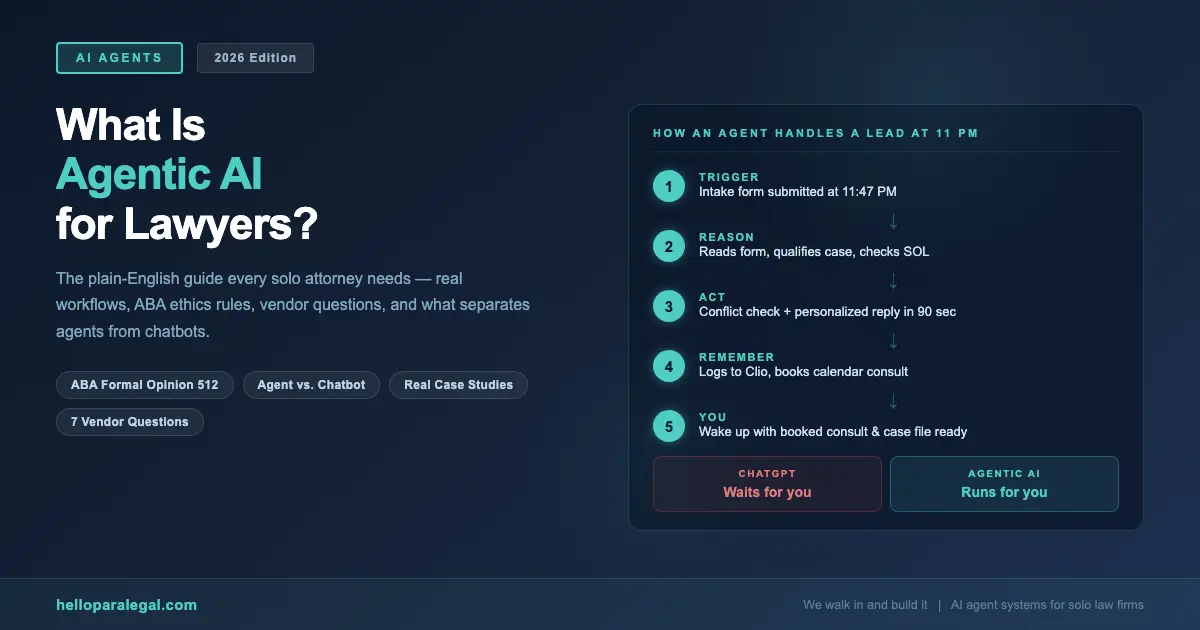
Scenario: A Personal Injury Lead at 10:47 PM
Maria is a solo PI attorney in Austin. She uses Clio for case management, Calendly for scheduling, and Gmail for client communication. An intake agent is connected to all three.
At 10:47 PM on a Tuesday, someone fills out her web intake form. They describe a rear-end accident from three weeks ago, mention soft tissue injuries, and leave their number.
Here’s what happens next, in order, with no human involved:
- The intake form submission triggers the agent (10:47:31 PM)
- The agent reads the submission and identifies: PI matter, Austin jurisdiction, recent accident, medical treatment mentioned, case appears within SOL (10:47:32 PM)
- The agent runs a conflict check against Maria’s Clio client database (10:47:33 PM): no conflict found
- The agent generates a personalized response email referencing the specific accident details, includes a direct booking link for a free 30-minute consultation, and asks one clarifying question about whether they’ve spoken to the other driver’s insurance yet (10:47:34 PM)
- Email sent (10:47:35 PM)
- The prospect books a Thursday 2 PM consultation at 11:03 PM
- The booking trigger fires: agent creates a preliminary matter record in Clio with all intake data, adds a calendar event with a pre-consultation prep note, and sends the prospect a confirmation email with instructions to bring photos and any insurance correspondence
- Maria’s Monday morning briefing (auto-generated every Monday at 7 AM) includes: “New consultation booked (Thursday 2 PM) PI, Austin, auto accident, no conflict. Clio record created.”
Maria did nothing. She wasn’t awake. By 11 PM that night, a qualified lead had been contacted, conflict-checked, and booked. Her conversion rate on web leads went from 34% (when she could respond the next morning) to 61% (with sub-90-second response). That difference is $94,000 in annual fees at her case volume. (We ran the math.)
Scenario: Billing Follow-Up Without the Awkward Call
A billing agent monitors invoice status in Clio. When an invoice hits 14 days unpaid, the agent sends a gentle reminder with a payment link. At 21 days: a follow-up noting the outstanding balance and asking if there are any questions. At 30 days: the agent flags the matter for attorney review with a draft follow-up email ready to approve.
A family law solo in Denver who deployed this agent saw her average invoice payment time drop from 47 days to 19 days. Her accounts receivable dropped by $38,000 in the first quarter. She did zero uncomfortable “have you paid yet” calls.
What Most Articles Get Wrong About Agentic AI for Lawyers
There’s a lot of noise on this topic. Here’s what to ignore.
Wrong: “Agentic AI will replace lawyers.” It won’t, and this framing is actively unhelpful. Agentic AI takes over Lane 2 work, operations, intake, scheduling, follow-up, billing, document assembly from templates. It doesn’t reason about law. It doesn’t strategize. It doesn’t advocate. The work that requires a law license stays with the lawyer. That’s not a limitation of the technology. It’s just an accurate description of what these systems do.
Wrong: “Any AI that does multiple steps is agentic.” Not quite. True agentic systems make contextual decisions. A workflow automation that sends a template email when a form is submitted isn’t agentic. It’s a rule. An agent that reads the form, decides whether the case qualifies, personalizes the response based on what the person wrote, and routes accordingly. That’s agentic. The difference is decision-making under conditions that weren’t explicitly pre-programmed.
Wrong: “You can just deploy an agent yourself using no-code tools.” You can get partway there with tools like Make or Zapier with OpenAI connections. But connecting an agent meaningfully to Clio, your calendar, your conflict database, your document templates, and your phone system, in a way that handles edge cases, doesn’t hallucinate into client matters, and passes an ethics review , requires actual integration work. The tools exist. The build is not trivial.
Wrong: “Set it and forget it.” Agents require ongoing attention. Triggers change. Client scenarios evolve. An agent that handled intake perfectly for a PI practice needs adjustment when you add estate planning. Review agent performance monthly. Catch what breaks. Update the criteria. This is maintenance, not “set and forget.”
The ABA Ethics Rules That Apply: Read This Before You Deploy
The ABA issued Formal Opinion 512 in July 2024. It’s the clearest guidance the profession has on AI tools, including agentic systems, and it covers six core obligations: competence, confidentiality, communication, candor toward the tribunal, supervisory duties, and fees. If you haven’t read it, the ABA’s professional responsibility resources are the place to start.
Here’s what it means practically for agentic AI:
Competence (Rule 1.1)
You’re required to understand the tools you use. Not at a code level. But you need to know what your agent can and can’t do, where it makes decisions, what it flags for human review, and how it handles errors. “My vendor set it up” is not a competence defense. You have to know enough to supervise it.
Supervision (Rule 5.3)
Every non-lawyer doing work in your practice (human or AI) requires adequate supervision. For an agentic AI system, that means: defined human review checkpoints for anything that touches client rights or legal advice, audit logs you can actually access, and a regular review process for what the agent is doing autonomously. An agent that sends client communications without any attorney review mechanism violates Rule 5.3. Build the review checkpoints in from day one.
Confidentiality (Rule 1.6)
Before you connect any agent to client data, ask where that data goes. Which model provider handles the reasoning? What are their terms on training data use? Is there an audit log? Is the communication encrypted? “We use AI” is not an answer. “We use Claude via Anthropic’s enterprise API under commercial terms that prohibit training data use, with all client data encrypted at rest and in transit” is an answer. Get it in writing.
Communication (Rule 1.4)
Your engagement letter should disclose that AI systems are involved in your practice. Clients don’t need a technical briefing. But they should know that non-attorney systems handle parts of their intake, scheduling, and routine communications. And that all substantive work is attorney-reviewed. This is both an ethics requirement and, honestly, a trust-builder.
The North Carolina Bar Association’s guidance on agentic AI offers a useful state-level perspective. Several states are now issuing their own opinions on top of the ABA framework. If you’re in Texas, California, or New York, check your state bar’s AI guidance specifically.
7 Questions to Ask Any Agentic AI Vendor
The market is full of tools calling themselves AI agents. Most are chatbots with a new label. Here are the questions that separate real from fake.
- Does it make decisions, or follow rules? Ask for a specific example where the agent handled a scenario that wasn’t explicitly programmed. If they can’t give you one, it’s an automation tool, not an agent.
- What triggers does it connect to? A real agent system connects to your actual triggers: web forms, phone calls, calendar events, CRM status changes. “It works through our dashboard” means you’re still the trigger.
- What systems does it integrate with natively? It should name your practice management system (Clio, MyCase, PracticePanther, Lawmatics) and your calendar and email. Vague answers here mean painful manual workarounds later.
- Where does my client data go, and under what terms? You need a specific answer: which model provider, what their commercial data terms are, and whether there’s an enterprise agreement that prevents training data use.
- What does the human review checkpoint look like? Every legitimate agentic AI system for law firms has defined points where attorney review is required. Ask exactly what those are. If everything is autonomous with no review, walk away.
- Can you show me an audit log? You need to be able to see what the agent did, when, and why. This isn’t optional. It’s a Rule 5.3 requirement. If there’s no audit trail, there’s no supervision mechanism.
- Who built the integrations, and who maintains them? An agent that works on day one but breaks when Clio updates its API is not a finished product. Ask who handles ongoing maintenance and what the SLA looks like when something breaks.
At Hello Paralegal, we can answer all seven in detail before we take a dollar. If a vendor can’t, that tells you what you need to know.
What Agentic AI Costs in 2026: Real Numbers
Nobody publishes pricing. Here’s what’s actually out there, based on what firms are paying.
| Approach | Monthly Cost | What You Get | Build Time | Who Maintains It |
|---|---|---|---|---|
| DIY (Make/Zapier + OpenAI) | $150–$400/mo in platform fees | Rule-based automations, limited reasoning | 20–80 hrs of your time | You |
| Legal SaaS with “AI agents” | $300–$800/mo | AI features inside one platform | 1–2 weeks setup | The vendor |
| Custom build (dev agency) | $2,000–$8,000/mo retainer | Fully custom, any integration | 6–12 weeks | Agency (costly) |
| Managed deployment (Hello Paralegal) | $600–$1,200/mo depending on scope | Purpose-built for law firms, maintained | 2–4 weeks | Hello Paralegal |
The DIY path sounds cheapest until you factor in the 60+ hours of setup time, the ongoing maintenance when integrations break, and the fact that most “agentic” DIY builds are really just multi-step Zapier flows with no real reasoning layer. They handle the scenario you built for and nothing else.
The ROI math is worth running with your own numbers. A solo attorney billing at $300/hour who recovers 1.5 billable hours per day by offloading Lane 2 work to an agent generates $112,500 in additional annual billing capacity. Against a $1,000/month agent deployment cost, that’s a 9x return. Before accounting for leads you’re currently losing because you can’t answer the phone during depositions.
And here’s the thing most attorneys don’t consider: the agent doesn’t take sick days, doesn’t need PTO, doesn’t quit after 14 months when their spouse gets a job in another city. The $600–$1,200/month is a fixed, predictable operational cost. Not a salary, not benefits, not recruiting fees.
Frequently Asked Questions
What is agentic AI in simple terms for lawyers?
Agentic AI is an AI system that takes action on your behalf, without you clicking anything, across multiple software tools, to complete a task from start to finish. Unlike ChatGPT (which waits for you to type a prompt) or legal software like Clio (which you have to log into and operate), an agentic AI system runs automatically when triggered by events (a new intake form, a phone call, an unpaid invoice) and completes the task across your actual systems without your involvement until a decision requires your judgment.
Is agentic AI different from workflow automation tools like Zapier?
Yes, significantly. Workflow automation tools like Zapier or Make follow explicit if-then rules that you define in advance. They handle exactly the scenario you programmed and nothing else. Agentic AI uses a large language model to reason about the situation and make contextual decisions. It can handle scenarios that weren’t explicitly pre-programmed, adapt its response based on what it reads, and chain multiple tools in sequence based on what it decides. The distinction matters because real client interactions don’t follow scripts.
Does the ABA allow lawyers to use agentic AI?
Yes, with proper supervision and disclosure. ABA Formal Opinion 512 (2024) addresses lawyer obligations when using AI tools, including autonomous systems. The core requirements are: competence (you must understand what the system does), supervision under Rule 5.3 (you need human review checkpoints for agent outputs that affect client matters), confidentiality protection under Rule 1.6 (you need to know where client data goes and under what terms), and client disclosure. Agentic AI is permitted. It requires the same ethical infrastructure as any non-lawyer staff member, just applied to a different type of tool.
What tasks can agentic AI handle autonomously in a law firm?
Agentic AI handles operational tasks that don’t require legal judgment: client intake (qualifying leads, running conflict checks, scheduling consultations), phone answering and call handling, post-consultation document preparation, invoice follow-up and payment reminders, deadline monitoring and weekly briefings, routine client status communications, document drafting from approved templates, and billing entry. It does not give legal advice, represent clients, or make strategy decisions. Those stay with the attorney.
How much does agentic AI cost for a solo law firm?
Costs vary widely depending on approach. DIY builds using Make or Zapier with AI connectors run $150–$400/month in platform fees plus significant setup time. Legal SaaS platforms with “AI agent” features run $300–$800/month. Purpose-built managed deployments designed specifically for law firms, like those from Hello Paralegal, run $600–$1,200/month depending on scope and include build, integration, and ongoing maintenance. Custom dev agency builds run $2,000–$8,000/month.
Will agentic AI replace paralegals?
No, not wholesale. Agentic AI handles high-volume, repetitive, rule-adjacent tasks well: intake, scheduling, billing follow-up, status communications, document assembly from templates. It doesn’t replace the judgment, client relationship skills, and substantive legal knowledge of a trained paralegal doing complex work like deposition prep, litigation support, or nuanced research. The more accurate picture: agentic AI handles the operational layer, freeing human paralegals (and attorneys) for higher-value work. At Hello Paralegal, we combine trained remote paralegals with AI workflow automation, one doesn’t replace the other.
How do I know if a vendor’s product is actually agentic AI?
Ask two questions. First: “Can you show me an example where the system handled a scenario that wasn’t explicitly pre-programmed?” A real agent can. An automation tool cannot. Second: “What is the reasoning layer?” A real agentic system uses an LLM (Claude, GPT-4o, etc.) to make contextual decisions. If the vendor describes an if-then rule system, it’s workflow automation with an AI label. Both can be useful. But they’re different products with different capabilities, and you should pay accordingly.
If you want to see agentic AI running inside a real law firm rather than described in a blog post, that’s exactly what we do. Hello Paralegal deploys agent systems built specifically for solo and small law firms. We handle the build, the integration, the ethics infrastructure, and the ongoing maintenance. You practice law. We run the operations.
Leave a Reply